
Tag: SEO

  • Picking Key Words for Search Engine Optimization

    Picking Key Words for Search Engine Optimization

    The last post we talked about what Search Engine Optimization (SEO) and key words are.  We had a link that would look at our site like a search engine does and tell us what it saw as key words. Now we know key words are how search engines direct people looking for those things to your website. We looked at places we can use keywords that readers don’t see but websites check.  So now we got what they are and where to put them besides using them naturally in out posts.  Now for the hard part – identifying what you want your keywords to be.

    That’s where I’m stymied.  That’s why I asked for you help as readers.  I’m trying to define my top five keywords.  The first step is defining what my site is about.   I have one for multiple reasons: to sell my writing, photography, and jewelry,  a form of creative outlet, to meet people with like interests, get feedback from on ideas,  share my love of comic books, and get some name recognition for my published works.

    Okay right there I know I want my keywords to include the following

    • my name
    • my published works
    • jewelry
    • my photographs
    • comic book reviews/commentary

    But those aren’t going to be five key words.  Okay my name is because that’s not gonna change.  Now to figure out how to sum up what I do in my blog on those other four things in keywords that the search engine will like but not a lot of other websites use the same phrase.  That’s where another link can come in handy.  Google’s Keyword Tool lets you enter in a phrase that describes the concept.  From there it generates a list of keywords but also lets you know how many searches there were for the terms and how heavy the competition is for the suggested term.  Here’s a screen capture of a search I did for  ‘comic book reviews.” (you can click on it to enlarge it)
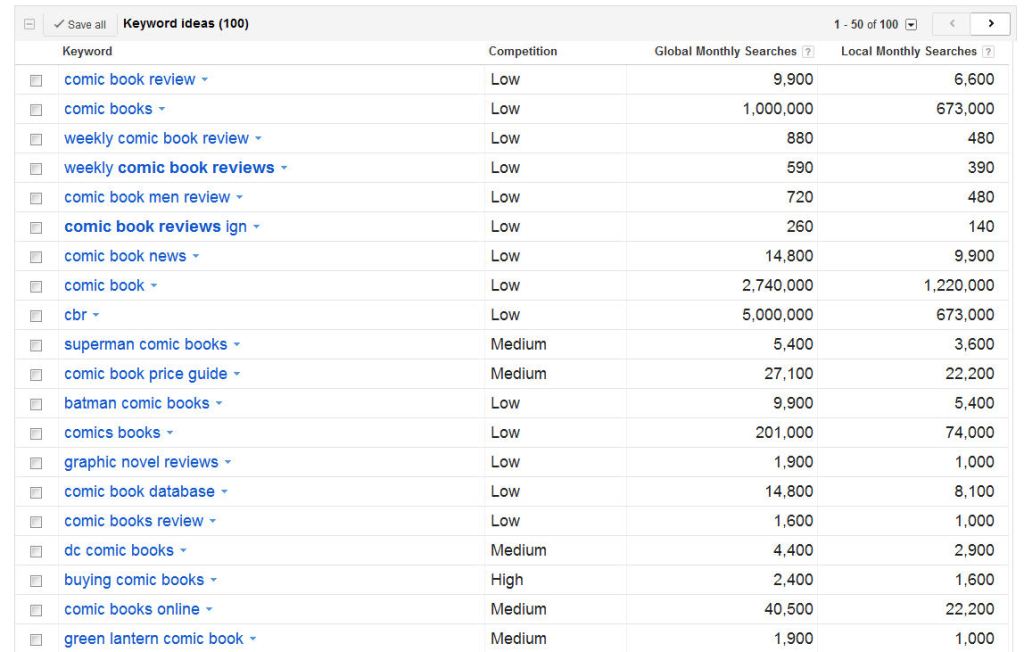
    list of results displaying four columns 1st column the key word 2nd competition of other sites using that word 3rd number of searches monthly globally 4th number of searches monthly in the USA in English

    So what does this mean? The first column there are keywords indexed by Google that relate to my entry.  The next column tells you what the competition is like on that term.  This is the number of websites vying to be on that coveted front page of search results.  Next is the number of searches performed world wide for that keyword. The local area set there was the default for my IP address which is USA, English, desktop/laptop.  For some reason Google won’t let you lump mobile devices in with traditional computers.  So here I see the term cbr doesn’t have a lot of competition but it gets a lot of searches – the reason is it’s a well established website called Comic Book Resource .  Great site!  I can’t and don’t want to compete with them on their name. I see that graphic novel reviews is low but gets a good number of hits – that’s very similar to what I do reviews of complete story arcs.  I might consider using that in my tags and alt text on comic book covers.

    One place I learned that was heavily weighted by the search engines is the tag line here are WordPress. Here’s a screen cap of my page to show you just what I mean by the tag line – it’s not the tags you mark on you posts.
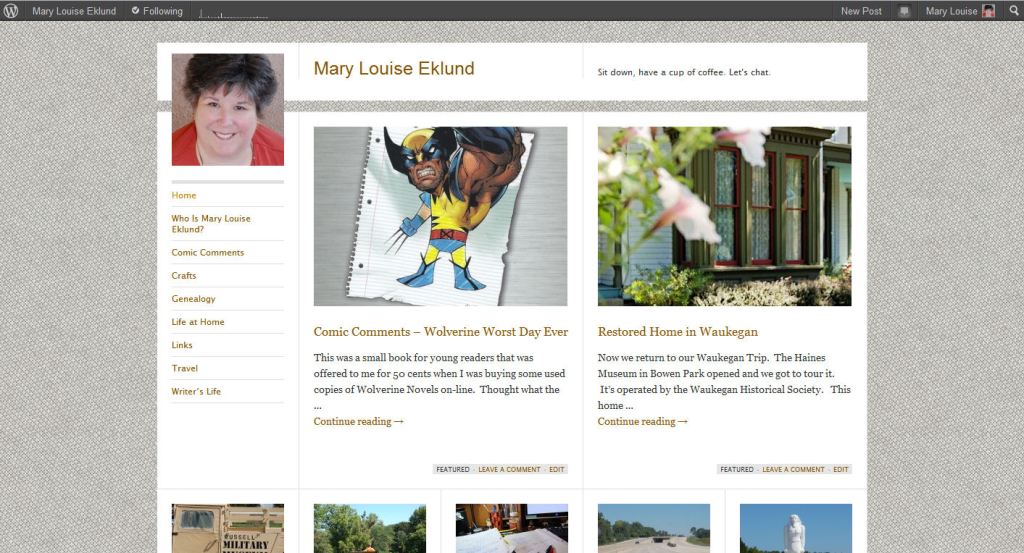
     You see there where it says “sit down, have a cup of coffee, let’s chat” ?  THAT’S my tag line.  THAT is weighted very heavy by search engines.  I need to think of a new one that reflects those five points up there, need to highlight keywords in that line right there.  When I do those will be weighted more heavily and people looking for the things I write about in this blog can find me.

    That’s it.  That’s all I know about Search Engine Optimization and keywords.  I’m not an expert by any means just a novice.  I don’t want to go overboard in this but being aware and doing little tweaks here and there (like a good tagline) can help improve the number of people I’m reaching.

    I’m only half way through my class.  Took the midterm recently and made a 96% WOOT! I am sure I’ll learn more as I go.  I’ll be sure to pass on that knowledge.  As I said in my earlier post – explaining a concept to another helps me grasp it.  Trust me this aging brain of mine needs all the help it can get grasping things.

  • Search Engine Optimization and Key Words

    Search Engine Optimization and Key Words

    dictionaries open in front of a result screen from Google +

    The wonderful Tess Kahn (check out her blog How the Cookie Crumbles) suggested I share more about Search Engine Optimization or SEO as the cool internet cats call it.  I’m a total greenhand at this so I’m learning as I go in my WordPress class.  From my personal experience I know the best way to master something is to have to teach it.  Thus her idea is an excellent one.

    You know when you want to find something on the web you go to a search engine to look for it? Most of the world turns to Google but other power players are Yahoo, Bing, Ask, etc.  When searching you enter key words about the thing you want to read about.  Say you were wanting to know how to groom your pet rock – you might try “groom pet rock”  or maybe “pet rock grooming” instead of asking a full question as if you are on Jeopardy.   Those are the key words of the search.

    Now let’s imagine you are keeping a blog on the adoption, training, and care of pet rocks.  You’d want to be there on the top of the first page of that search wouldn’t you?  I mean here’s a fellow pet rock lover that wants to groom their rock appropriately!  Being aware that one important set of key words for your blog is pet rock – you’d want to be sure to use those words in your tag line, text of some posts, titles,  permalinks, image descriptions, image alternate text, tags and categories.  Not that you need to make sure every one of those has it every single time but use it naturally.  Maybe when your are tempted to say domesticated stones you  might consider using the term pet rocks instead.

    So now we sit here with our Pet Rock blog how do the search engines find us so that person looking for grooming tips knows about.  This is where very powerful programs with lots of magic (okay it’s not magic it’s code) goes out and looks for sites that use that word, have links to that word, use that word on the backside of stuff (areas programs see but not people so much), that is linked to from other sites previously marked as good pet rock sites.  That’s where this link comes in to play.  That’s the one my professor shared with us as a good tool to see our website as search engines see it.

    Search engines don’t go out and index just when queried.  Instead they are constantly spidering out over websites and indexing them.  That way when someone asks about pet rock grooming it goes to the index and pulls up what it has found as well as running quick queries out to previously good sources and their links.

    Let’s think about that for the Pet Rock Blogging Bloke – he’d want pet rock there in his top five results.  That would mean whenever anyone searched for something with the phrase pet rock his site would quickly appear in the search.  Now what else he’d want there might be pet rock adoption, pet rock care, Blogging Bloke, and maybe his Pet Rock Shop’s name.  So if anyone searched on any combo of those words he’d be at the top of the indexed results.

    Blogging Bloke doesn’t want to hammer his visitors over the head with repeated use of the same phrases.  That gets annoying and honestly the search engine spiders are programmed to discount over use of a term in certain areas.  So you can’t just make a post of repeating your 5 keywords over and over to pump up your indexing on those issues.  However using them well in the back areas can do that for you.

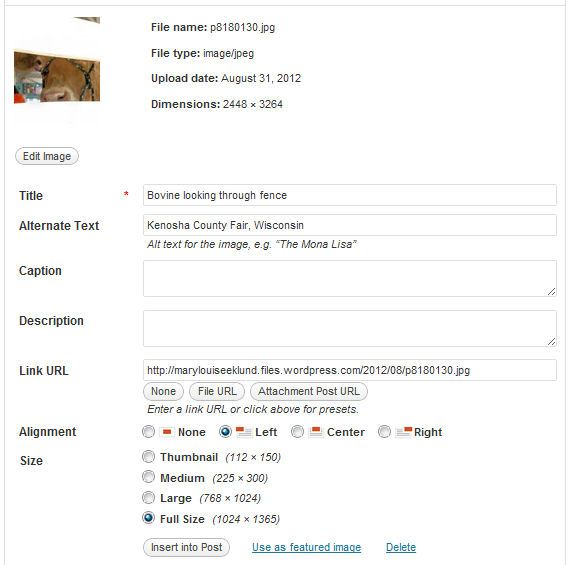
    Shows WordPress Image menu with all the fields

    Remember I did a post explaining what title, alternate text, caption, and description do in the uploaded image menu?  Well here’s another use for Description and Alt Text – putting in your key words.  Search Engine spiders read these fields but most readers don’t see/hear them.  Do keep in mind the Alternate Text is used by screen reading programs used by the visually impaired.  You can use your phrases here that apply to the image and it’s an extra boost to your indexing.

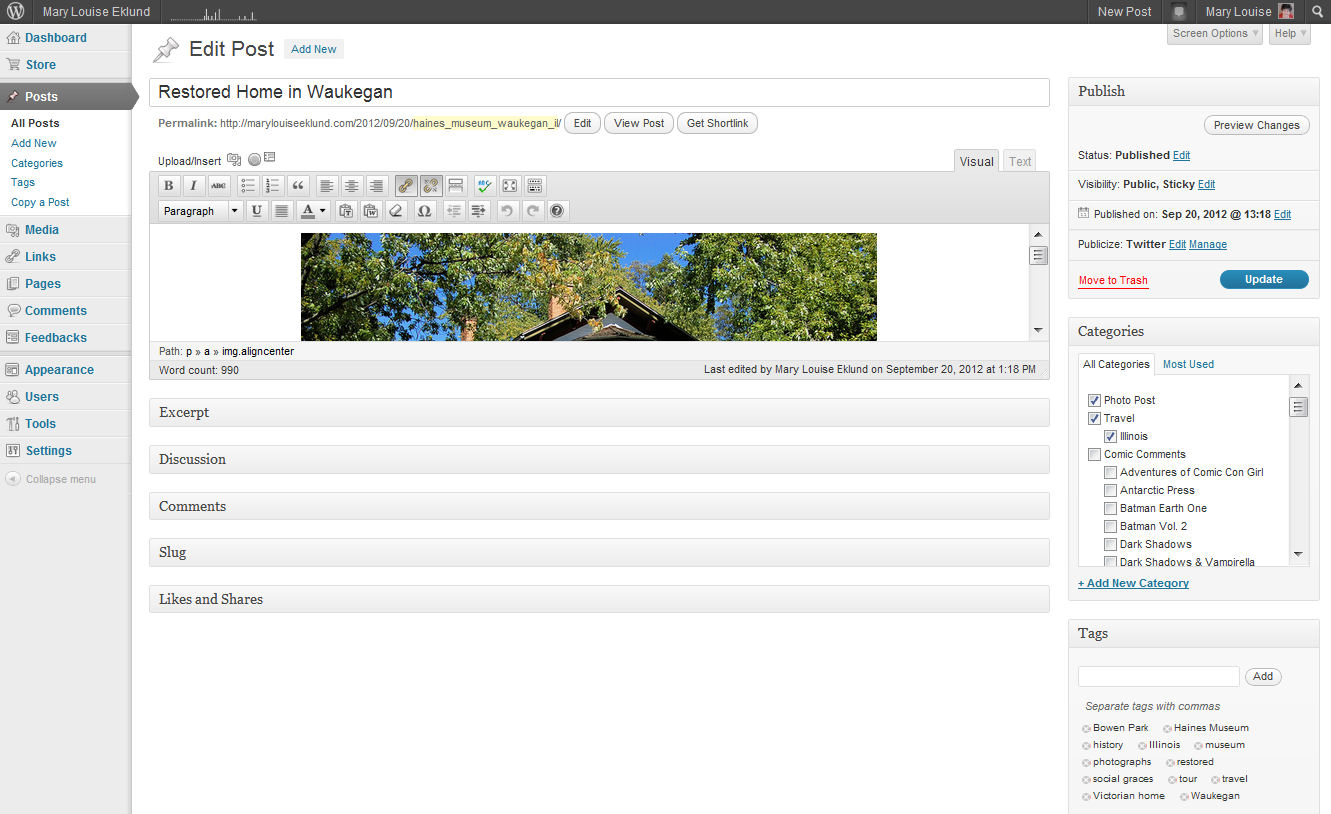
    View of updating a post on back end of WordPress

    Okay if you are WordPress user you recognize this as the dashboard side of WordPress.com.  Here we are in the update post screen.  Look at the yellow there below the title, that’s the permalink.  (you can click on the image to enlarge if you are like me with reading small print).  That is what shows up in the address bar of a browser.  By default WordPress sets this to reflect what you name your post.  You can change this to better reflect keywords of the post.  There just past the yellow is the edit button click on it and delete the title from open text box.  Then you want to put in keywords that you think would be used to search for a post like this.  Here in this case I put the museum’s name and location.  Remember urls can’t have spaces put an underscore (_) where you’d normally put a space.  Then save the change you made and there it’s got the keywords and now your title catches readers while your url  or Permalink catches search engines.

    This is getting long so in another post sometime in the next week we’ll talk about how to determine what keywords are best for you.  That’s really what I’ve been puzzling over for myself.  I’ll use me as a guinea pig for that post as I work through just how I want to better define my blog and website.

  • Asking For Your Help

    Asking For Your Help

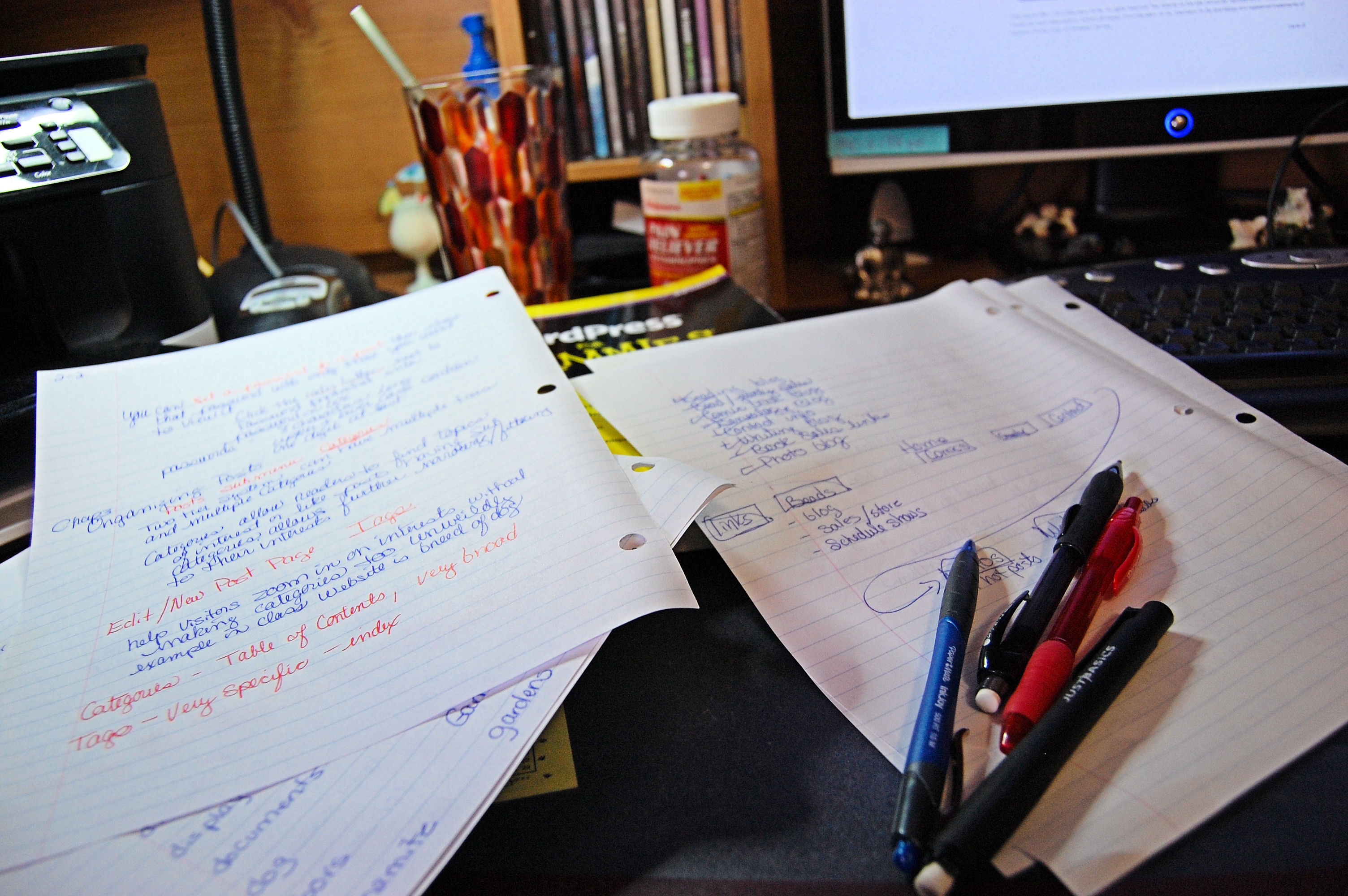
    shot of my desk with notes from WordPress class

    Wow, just completed another lesson in my class.

    I’ve got lots of thinkin’ to do.  (I’d posted this over at Google+ but thought I’d share it here too because any help would be GREATLY appreciated)

    This one was thinking about how search engines see your site.  We are now moving into the aspect of website design to increase traffic to your pages/blog.  This lesson was about keyword use and how search engine spiders look for good use of key words. They have algorithms that discount over use of keywords that wouldn’t be natural & would be deliberate spamming of spiders.   The assignment is to come up with five keywords for our website and work them in naturally to specific locations in the site.  This link was provided by the professor as a tool to see your  keyword usage  as a website spider sees it.  It’s free just put in your address and type in the captcha code to show you aren’t automated and in just a few seconds it generates a list of keywords based on typical search engine techniques.  WOW that was an eye opener to me.

    My top five were

    1. Comments
    2. Continue Reading
    3.  Mary Louise Eklund (good my name good)
    4. coffee let’s chat
    5. Comic Comments (good a repeating column like posting)

    Oh dear seems three of my top five aren’t great.  They are really blah stuff that every site should have.  I like my name being there and want it to be in the top five but I’m not sure what other words I should make an effort to incorporate regularly into text, titles, backside search engine fields, and such.

    Obviously too much weight is put on the tag line, that’s where coffee let’s chat appears ONCE but the weight it is getting is heavy.  I need to rethink my tagline to represent me.  My thoughts on my keywords are summed up in the following list in no particular order –

    1. photographer
    2. writer
    3. comic book fan
    4. hobby genealogist
    5. custom jewelry maker
    6. Mary Louise Eklund (gotta have name recognition).

    So if you’ve stuck with reading this whole post I must ask a favor in the comments.  Give me a list of 5 key words for me that you think represent me.  I just did a quick 6 there.  If you can’t do five then one.  If you can’t do one what  one from my list there do you think is the most important?